

Canon PowerShot G16 review – Noise, resolution and sensitivity

Image: The G16’s lens stabilisation and high ISO allow for sharp handheld images
Images from ISO 80-400 only show luminance noise when zoomed in at 100%. Most of the noise in raw images is in midtone areas. In-camera noise reduction takes good care of JPEGs, leaving them with a good level of detail and almost noise-free.
When viewing the JPEGs taken at ISO 640-800 at 100%, I noticed that finer detail starts to smudge and there’s a loss of some sharpness due to the in-camera noise reduction. However, when I viewed images in full-screen mode on a 15in monitor, the noise was not noticeable. At this size, the point at which noise starts to become noticeable is ISO 1600, although JPEGs taken right the way up to ISO 3200 are still very usable and it’s only at ISO 6400 that luminance noise starts to become a problem. Images taken at the maximum ISO 12,800 are worth avoiding, because here JPEGs suffer significant loss of detail and raw images have a strong blue noise in shadow areas. Interestingly, even at this ISO no colour noise is evident.
I found that through the higher ISO settings, raw images have speckly luminance noise, which is better processed using software such as Adobe Lightroom/Camera Raw. Also, these raw images lack sharpness, saturation and contrast. Processing in Lightroom provides much better results and a greater level of detail than the corresponding JPEG images.
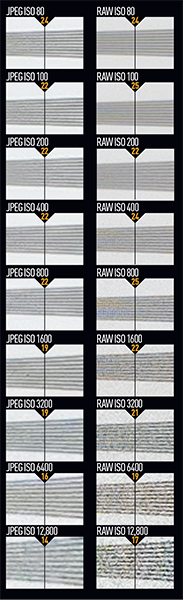
These images show 72ppi (100% on a computer screen) sections of images of a resolution chart, captured using the 28-140mm lens set to 50mm and f/4. We show the section of the resolution chart where the camera starts to fail to reproduce the lines separately. The higher the number visible in these images, the better the camera’s detail resolution is at the specified sensitivity setting.


